SortableList
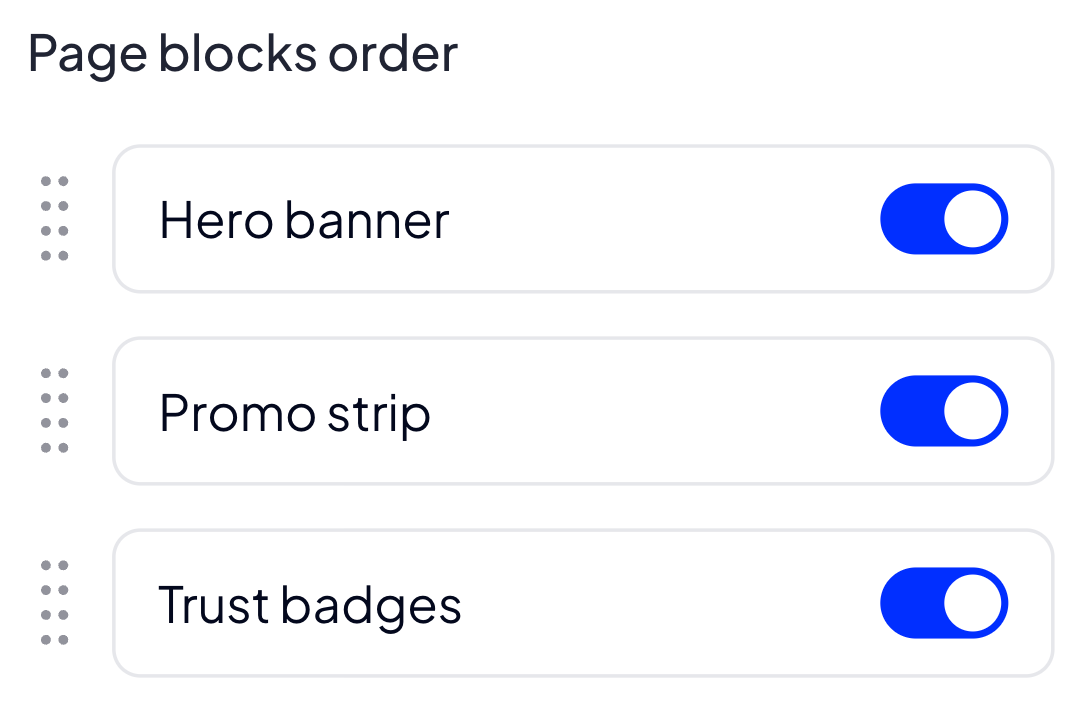
SortableList element renders a reorderable list of toggleable items. The author defines a fixed catalog of items in the schema (each item has a stable key, a localizable label and a type); the Merchant can drag rows to change their order and flip each row on/off. The output preserves the Merchant-chosen order and the per-row value (currently 0/1 for switchCheckbox/checkbox).
Options
| Name | Type | Required | Description |
|---|---|---|---|
| items | array | yes | List of items in the catalog. Each item has key, label and type. Cannot be empty. |
{
  "options": {
    "items": [
      { "key": "title",   "label": "Title",   "type": "switchCheckbox" },
      { "key": "reviews", "label": "Reviews", "type": "checkbox" },
      { "key": "specs",   "label": "Specs",   "type": "switchCheckbox" }
    ]
  }
}
items
array Required non-empty list of items. Each entry must be an object with three keys: key, label, type. key values must be unique within the list.
items.key
string | number Stable identifier of the item. Used as the relation itemKey and as the entry key in the value. Must be unique across all items.
items.label
string Human-readable label shown next to the row. Subject to translation through the schema translations bucket.
items.type
string Toggle UI rendered for the row. Allowed values:
"switchCheckbox"- switch-style toggle"checkbox"- classic checkbox
{
  "options": {
    "items": [
      { "key": "title",   "label": "Title",   "type": "switchCheckbox" },
      { "key": "reviews", "label": "Reviews", "type": "checkbox" }
    ]
  }
}
Build-in Validators
Element validates that the submitted value is a list where:
- every entry is an object with exactly two keys,
keyandvalue, keyis one of the keys declared inoptions.items,valueequals0or1,- no key is repeated across entries.
Available Validators
Element does not have any available validators.
Relations Support
Element supports relations between elements. It can be a relation parent, with a non-standard parentValueToActionsMap.value shape. See Relations as parent below.
Relations as parent
When SortableList is the relation parent, each entry in parentValueToActionsMap must have value shaped as:
Semantics:
itemKeyselects which row of the sortable list this rule watches- the inner
value(0or1) is matched against the row'svaluefield
[
  {
    "name": "sections_order",
    "type": "sortableList",
    "label": "Sections order",
    "options": {
      "items": [
        { "key": "title",   "label": "Title",   "type": "switchCheckbox" },
        { "key": "reviews", "label": "Reviews", "type": "switchCheckbox" },
        { "key": "specs",   "label": "Specs",   "type": "switchCheckbox" }
      ]
    }
  },
  {
    "name": "title_text",
    "type": "text",
    "label": "Title text",
    "isHidden": true,
    "relations": [
      {
        "parentName": "sections_order",
        "parentValueToActionsMap": [
          {
            "value": { "itemKey": "title", "value": 1 },
            "actions": ["setVisibleAndRequired"]
          },
          {
            "value": { "itemKey": "title", "value": 0 },
            "actions": ["setHiddenAndOptional"]
          }
        ]
      }
    ]
  }
]
Configuration output schema
{
  "<element_type>": "sortableList",
  "<element_name>": string,
  "<element_label>": string,
  "<element_labelDescription>": string,
  "<element_isRequired>": bool,
  "<element_isHidden>": bool,
  "<element_supportsTranslations>": bool,
  "<element_options>": {
    "<element_option_items>": [
      {
        "<items_key>": string | number,
        "<items_label>": string,
        "<items_type>": "switchCheckbox" | "checkbox"
      }
    ]
  }
}
{
  "name": "sections_order",
  "type": "sortableList",
  "label": "Sections order",
  "supportsTranslations": true,
  "options": {
    "items": [
      { "key": "title",   "label": "Title",   "type": "switchCheckbox" },
      { "key": "reviews", "label": "Reviews", "type": "checkbox" },
      { "key": "specs",   "label": "Specs",   "type": "switchCheckbox" }
    ]
  }
}
Element value
The value is an ordered list of { key, value } objects, one entry per item declared in options.items. The order in the list reflects the Merchant-chosen ordering; the value field currently uses the same 0/1 convention as the Checkbox element.
| Name | Type | Description |
|---|---|---|
| key | string | Stable identifier matching one of options.items[].key |
| value | int | 0 (disabled) or 1 (enabled) for switchCheckbox/checkbox row types |
[
  { "key": "reviews", "value": 1 },
  { "key": "title",   "value": 1 },
  { "key": "specs",   "value": 0 }
]
<ul class="product__sections">
    {% for entry in moduleConfig.sections_order %}
        {% if entry.value %}
            <li class="product__section product__section--{{ entry.key }}">
                {% if entry.key == 'title' %}
                    <h2>{{ moduleConfig.title_text }}</h2>
                {% elseif entry.key == 'reviews' %}
                    {% include 'reviews/list.twig' %}
                {% elseif entry.key == 'specs' %}
                    {% include 'product/specs.twig' %}
                {% endif %}
            </li>
        {% endif %}
    {% endfor %}
</ul>
<ul class="product__sections">
    <li class="product__section product__section--reviews">
        <!-- reviews list -->
    </li>
    <li class="product__section product__section--title">
        <h2>Best seller</h2>
    </li>
</ul>
Example of module
Twig
<div class="product_card">
    <ul class="product_card__sections">
        {% for entry in moduleConfig.sections_order %}
            {% if entry.value %}
                <li class="product_card__section product_card__section--{{ entry.key }}">
                    {% if entry.key == 'title' and moduleConfig.title_text %}
                        <h2>{{ moduleConfig.title_text }}</h2>
                    {% elseif entry.key == 'reviews' %}
                        {{ translate('Reviews placeholder') }}
                    {% elseif entry.key == 'specs' %}
                        {{ translate('Specs placeholder') }}
                    {% endif %}
                </li>
            {% endif %}
        {% endfor %}
    </ul>
</div>
JSON configuration
[
  {
    "label": "Sections",
    "state": "unfolded",
    "elements": [
      {
        "name": "sections_order",
        "type": "sortableList",
        "label": "Sections order",
        "supportsTranslations": true,
        "options": {
          "items": [
            { "key": "title",   "label": "Title",   "type": "switchCheckbox" },
            { "key": "reviews", "label": "Reviews", "type": "checkbox" },
            { "key": "specs",   "label": "Specs",   "type": "switchCheckbox" }
          ]
        }
      },
      {
        "name": "title_text",
        "type": "text",
        "label": "Title text",
        "supportsTranslations": true,
        "isHidden": true,
        "relations": [
          {
            "parentName": "sections_order",
            "parentValueToActionsMap": [
              {
                "value": { "itemKey": "title", "value": 1 },
                "actions": ["setVisibleAndRequired"]
              },
              {
                "value": { "itemKey": "title", "value": 0 },
                "actions": ["setHiddenAndOptional"]
              }
            ]
          }
        ]
      }
    ]
  }
]
JSON translations
{
  "module": {
    "pl_PL": {
      "Reviews placeholder": "Tutaj wyświetlimy opinie",
      "Specs placeholder": "Tutaj wyświetlimy specyfikację"
    },
    "en_US": {
      "Reviews placeholder": "Reviews are rendered here",
      "Specs placeholder": "Specs are rendered here"
    }
  },
  "schema": {
    "pl_PL": {
      "Sections": "Sekcje",
      "Sections order": "Kolejność sekcji",
      "Title": "Tytuł",
      "Reviews": "Opinie",
      "Specs": "Specyfikacja",
      "Title text": "Tekst tytułu"
    },
    "en_US": {
      "Sections": "Sections",
      "Sections order": "Sections order",
      "Title": "Title",
      "Reviews": "Reviews",
      "Specs": "Specs",
      "Title text": "Title text"
    }
  }
}